Do you find it difficult to remember your daily expenses? Do you want to know how much money you spend every month? A Free Mobile App can help you record your income and expenses easily. The Day-to-Day Expenses app helps you manage your daily money transactions from your smartphone. It is useful for anyone who wants to keep track of their money.
What Is the Day-to-Day Expenses App?
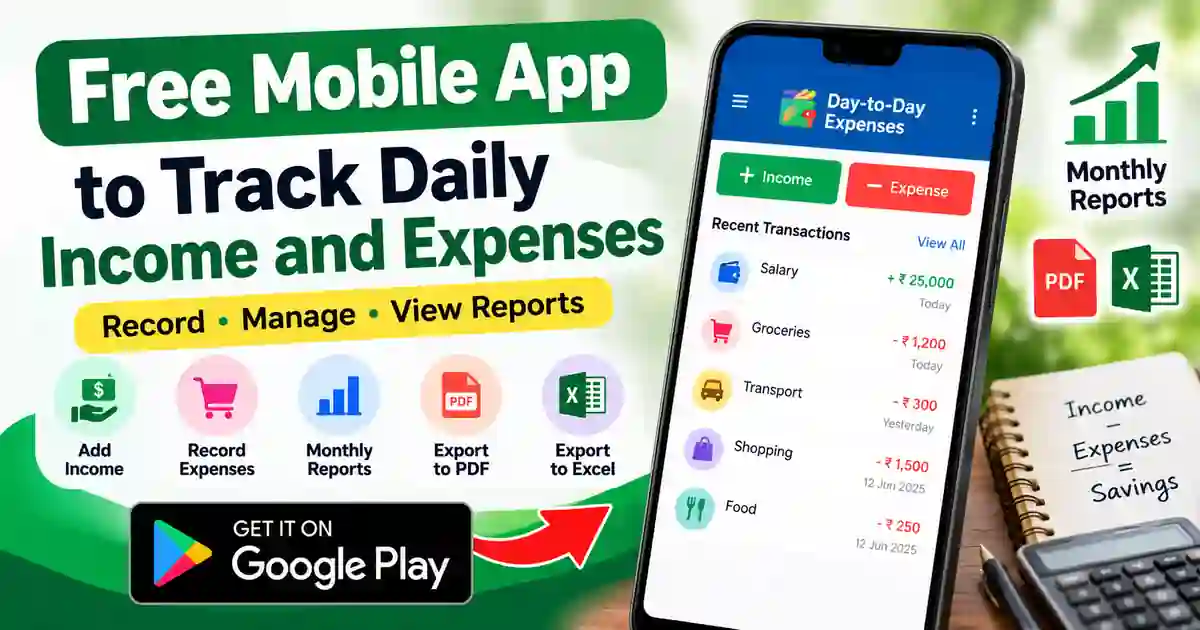
Day-to-Day Expenses is a personal finance app for Android users. You can use it to record the money you receive and the money you spend. The app helps you organise your transactions and understand your spending habits. You can also check reports to see where your money goes. This makes it easier to manage your monthly budget.
Main Features of This Free Mobile App
This Free Mobile App offers several useful features for daily money management. You can add income, record expenses and organise transactions into different categories. It also provides daily, monthly and yearly reports. You can export financial records to Excel and save reports as PDF files. Some features and options may depend on the app version.
How to Download the Free Mobile App
Follow these simple steps to install the app on your Android phone.
- Open the Google Play Store on your mobile phone.
- Search for Day-to-Day Expenses.
- Check that the developer name is Padmaja Seshadri.
- Tap the Install button.
- Wait until the installation is complete.
- Open the app and follow the instructions on the screen.
You can also download it directly from the official Google Play Store link below.
How to Use the App Step by Step
Step 1: Open the App
After installing the app, open it from your mobile phone. Follow any setup instructions shown on the screen. Depending on the version, you may be able to create a profile or select an account. Choose the options that match your needs. You can then start recording your daily transactions.
Step 2: Add Your Income
Whenever you receive money, open the app and choose the option to add income. Enter the amount you received and select a suitable category if available. You can also add a short note to explain where the money came from. Check the amount before saving the entry. This helps you keep an accurate record of your income.
Step 3: Record Your Expenses
Whenever you spend money, add a new expense in the app. Enter the amount you paid and select the correct category, such as food, travel or shopping. Add a note if you want to remember what you purchased. Check the details and save the entry. By recording expenses regularly, you can understand your spending habits.
Step 4: Check Your Daily and Monthly Reports
The app provides reports that help you review your recorded transactions. Open the reports section and select the period you want to check. You may be able to view daily, monthly or yearly summaries. These reports help you compare your income with your expenses. As a result, you can identify areas where you may be able to save money.
Step 5: Save or Export Your Records
If you want to keep a copy of your financial records, check the app’s export options. The app supports options such as PDF summaries and Excel exports. Choose the available format and follow the instructions shown on your screen. You may also find a Google Drive backup option in the app. Check the settings before backing up your personal financial information.
Who Can Use This Free Mobile App?
This Free Mobile App may be useful for students, salaried employees, shop owners and families. Students can record their pocket money and daily spending. Employees can track their monthly expenses and plan their budgets. Small business owners may use it to organise personal transactions. However, it should not be considered a replacement for professional accounting software.
Is the Day-to-Day Expenses App Free?
The app is listed on Google Play as free to download and contains advertisements. Before installing it, check the current Play Store listing for the latest information. Some options may vary depending on the app version. You should also review the app’s permissions and privacy information. Avoid entering sensitive banking details unless you understand how the information is handled.
Important Privacy Tips
Your income and expense records may contain personal financial information. Therefore, use a screen lock on your phone and keep your device updated. Review the app’s privacy policy and Google Play data safety information before using it. If you enable cloud backup, check which account stores your data. Never share your financial records or backup access with unknown people.
Frequently Asked Questions
1. What is the Free Mobile App used for?
It helps you record daily income and expenses. You can organise transactions and review reports to understand your spending.
2. Can I use this app on an Android phone?
Yes. The app is available through the Google Play Store for Android devices. Check the listing to confirm compatibility with your phone.
3. Can I check my monthly expenses?
Yes. The app offers reports that help you review transactions over different periods, including monthly summaries.
4. Can I export my expense records?
The app supports PDF summaries and Excel exports. Open the app and check the available options on your version.
5. Does the app contain advertisements?
Yes. The Google Play listing identifies the app as containing ads. Review the current listing for updated information.
Conclusion
If you want a simple way to record your daily income and expenses, Day-to-Day Expenses is worth exploring. This Free Mobile App can help you organise transactions and review your spending through reports. For the best results, enter your income and expenses regularly. Remember to check the app’s privacy information before saving personal financial details. Download the app only from the official Google Play Store link provided above.