
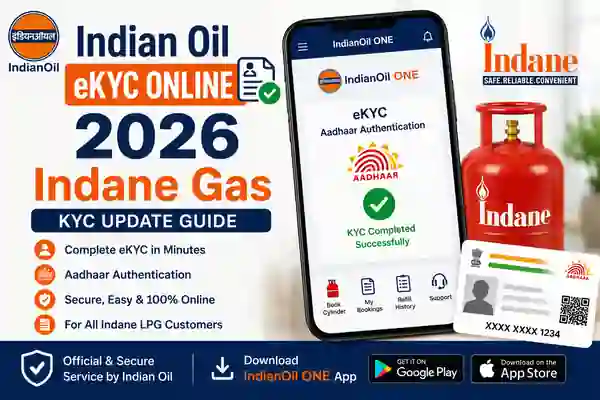
Indane Gas eKYC Online 2026 is a digital identity verification process for eligible Indane LPG customers. Indane is the LPG brand of IndianOil and serves millions of households across India. eKYC helps customers complete identity authentication through an authorised digital process instead of depending only on a physical visit to an LPG distributor. IndianOil’s official LPG information and distributor pages currently promote biometric Aadhaar authentication for Indane LPG customers.
The online process is especially useful for customers who have received a KYC or Aadhaar authentication request for their LPG connection. IndianOil has provided digital LPG services through the IndianOil ONE app, allowing customers to manage their LPG account and other services from a smartphone. However, the exact eKYC screen can vary depending on the customer’s account and the current version of the app. Therefore, always follow the instructions displayed inside the official IndianOil service.
Can Indane Gas eKYC Be Done Online?
Yes. Indane Gas eKYC Online can be completed through supported IndianOil digital services when the eKYC option is available for the customer’s LPG connection. IndianOil’s official distributor pages currently tell customers to complete biometric Aadhaar authentication eKYC using the IndianOil ONE app. This makes the smartphone-based process a convenient option for eligible LPG consumers.
Customers should understand that online eKYC availability can depend on the LPG account and current service configuration. Some users may see the eKYC option directly in their account, while others may be asked to complete the process through another authorised channel. If the option does not appear, there is no need to use an unofficial website or APK. Instead, contact the authorised Indane distributor or IndianOil customer support.
How to Complete Indane Gas eKYC Online
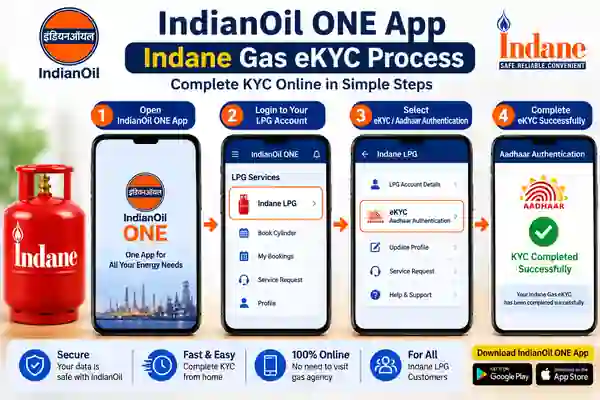
To begin Indane Gas eKYC Online 2026, first install the official IndianOil ONE application from the Google Play Store or Apple App Store. Open the application and sign in using the details associated with your IndianOil LPG account. Once you enter the LPG section, check for the KYC, Aadhaar authentication, or eKYC option available for your connection.
If biometric Aadhaar authentication is available, follow the instructions displayed on the screen and complete the required verification. The process may use your smartphone camera or another supported authentication method depending on the service flow. Before starting, make sure your internet connection is stable and the application is updated. Do not share your Aadhaar OTP, password, or authentication information with another person.
IndianOil ONE App for Indane LPG
The IndianOil ONE app is the official consumer application from Indian Oil Corporation Limited. It provides access to IndianOil LPG services, including LPG cylinder booking, booking history, distributor search, LPG account management, and service requests. The current Google Play listing identifies Indian Oil Corporation Limited as the developer of the application.
Using the official app is safer than downloading an APK from a third-party website. App menus can change after updates, so older screenshots or videos may not exactly match the current interface. If you cannot find the eKYC option, update the application first and check your LPG account again. If it still does not appear, contact IndianOil or your authorised Indane distributor.
Aadhaar Authentication for Indane eKYC
Aadhaar authentication is an important part of the biometric eKYC process promoted for Indane LPG customers. During the verification process, the customer follows the instructions provided by the authorised IndianOil service. Depending on the current authentication flow, biometric or face-based verification may be used to confirm the customer’s identity.
For successful authentication, make sure your phone camera is clean and your face or biometric input is clearly captured when requested. Use good lighting and follow every instruction shown on the screen. Most importantly, never give your Aadhaar OTP, bank details, password, or other confidential information to an unknown person claiming to complete eKYC on your behalf.
App Download Links
What You Need Before Starting
Before starting Indane Gas KYC Update, keep your LPG customer information ready. Your registered mobile number should be accessible because it may be required for account login or verification. Also make sure that the IndianOil ONE app is installed from an official app store and updated to the latest available version.
If Aadhaar authentication is required, keep your Aadhaar-related details available for the authorised verification process. Enter your information carefully and check the details displayed on the screen before submitting anything. If your LPG customer details do not match or the verification fails repeatedly, contact the authorised distributor instead of attempting the process through an unofficial service.
What If Indane eKYC Is Not Working?
If Indane Gas eKYC is not working, first check your internet connection and update the IndianOil ONE application. Also make sure you are using the official application published by Indian Oil Corporation Limited. A temporary server problem or service maintenance can sometimes prevent a digital service from completing successfully.
If the eKYC option is missing, check your LPG account again after updating the app. If the problem continues, contact IndianOil customer support or your authorised Indane distributor. IndianOil currently lists 1800-2333-555 as its toll-free customer-care number and 1906 as the LPG emergency helpline. Use official support channels instead of paying unknown agents to complete KYC.
Frequently Asked Questions
What is Indian Oil e-KYC?
Indian Oil eKYC is the digital identity verification process used for eligible Indane LPG customer services.
Can I complete Indane Gas eKYC online?
Yes. IndianOil has promoted smartphone-based biometric Aadhaar authentication for Indane LPG customers, subject to the service being available for the customer’s account.
Which app is used for Indane LPG services?
The official IndianOil ONE app provides access to IndianOil LPG account services and is published by Indian Oil Corporation Limited.
Is Indian Oil e-KYC free?
IndianOil’s official communication describes the smartphone-based biometric Aadhaar e-KYC facility for Indane LPG as free.
What if the eKYC option is not showing?
Update the official IndianOil ONE app and check your LPG account again. If the option remains unavailable, contact your authorised Indane distributor or IndianOil customer support.
What is the IndianOil LPG customer-care number?
IndianOil lists 1800-2333-555 as its toll-free customer-care number. For LPG leakage emergencies, the 24-hour number is 1906.
Official App Links
Watch video
Conclusion
Indian Oil eKYC update gives eligible Indane LPG customers a convenient way to complete identity verification through digital services. IndianOil has promoted smartphone-based biometric Aadhaar authentication for Indane LPG, while the official IndianOil ONE app provides a range of LPG account and customer-service features.
For a safe KYC update, always use the official IndianOil ONE application or IndianOil website and follow the instructions shown for your LPG connection. Keep your registered mobile number available, avoid unofficial APK files, and never share OTPs or sensitive Aadhaar information with unknown people. If online eKYC does not work, the official customer-care channel or authorised Indane distributor is the safest next step.


