
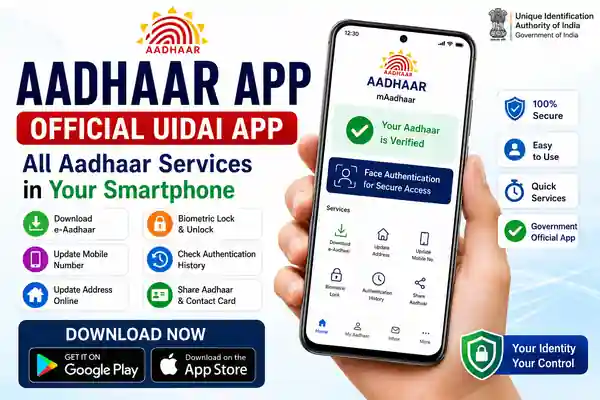
The Aadhaar App is the official mobile application from the Unique Identification Authority of India (UIDAI). It is designed to bring several Aadhaar-related services directly to Android and iPhone users. The current official UIDAI information says the app supports services such as mobile number update, address update, biometric lock and unlock, authentication history, e-Aadhaar download, contact-card sharing and request tracking.
The app is different from the myAadhaar website because it is designed specifically for smartphone users. UIDAI describes the Aadhaar App as a mobile-based application, while myAadhaar is a login-based web portal offering Aadhaar services online. This makes the app useful for people who want to access important Aadhaar facilities directly from their phone.
Aadhaar App Features
The latest Aadhaar App provides several useful digital identity services in one place. Users can manage selected Aadhaar details, access authentication history, download e-Aadhaar and manage biometric security features. The app also supports sharing and verification of Aadhaar-related digital credentials, giving users more control over how their identity information is used.
UIDAI has also introduced features related to Aadhaar Verifiable Credentials. According to a 2026 UIDAI circular, Aadhaar credentials shown, shared or verified through the Aadhaar App can be used as a legally recognised digital form of establishing identity, subject to the applicable rules. This makes the app more than just a document-viewing application.
How to Register on the Aadhaar App
Getting started with the Aadhaar App requires a compatible smartphone and an internet connection. UIDAI currently states that Android users should have Android 9.0 or above, while iPhone users should have iOS 16.0 or above. The registration process begins by selecting a language and entering the Aadhaar number.
After accepting the terms and privacy policy, users select the appropriate SIM card and complete Face Authentication when prompted. Once registration is completed, the user can set a six-digit PIN to protect access to the application. Follow the instructions displayed inside the official app and avoid using modified or unofficial APK files.
Aadhaar App Android and iPhone Download
The official Aadhaar App is available for both Android and iPhone. UIDAI’s official website directly provides the Google Play and Apple App Store links, making it easy to identify the genuine application. Before installing, check that the developer is Unique Identification Authority of India (UIDAI).
The current Google Play listing identifies UIDAI as the developer and shows the app was updated in June 2026. The iPhone listing also identifies UIDAI as the developer and requires iOS 16 or later.
What Can You Do With the App?
The Aadhaar App brings several frequently used Aadhaar services together. Depending on the service currently available to your account, you can update your mobile number or address, manage biometric locking, check authentication history, download e-Aadhaar and track requests. The app can also be used for sharing Aadhaar-related digital credentials and contact information.
These features can reduce the need to use multiple Aadhaar-related services separately. However, not every Aadhaar service can necessarily be completed entirely through the app. Some updates or enrolment-related requests may still require an Aadhaar Seva Kendra or other authorised centre, depending on the service and verification requirements.
Aadhaar App vs myAadhaar
The Aadhaar App and myAadhaar are both official UIDAI services, but they work differently. The Aadhaar App is designed for Android and iOS smartphones, while myAadhaar is a web-based portal where Aadhaar number holders can access a range of online services.
For people who frequently use a smartphone, the app can be more convenient for supported services. For browser-based services and functions not available in the application, myAadhaar can be useful. Always use official UIDAI platforms when entering your Aadhaar number or other personal information.
Also Read
- Indian Oil eKYC Online 2026: Step-by-Step KYC Update Guide
- AIR SUVIDHA 2.0: How to Fill the Health Self-Declaration Form Before Traveling to India
- E2PDF – SMS Call Backup Restore App: The Complete Guide to Secure Mobile Data Backup
Frequently Asked Questions
Is the Aadhaar App official?
Yes. The current Android and iPhone listings identify UIDAI as the developer, and UIDAI’s official website provides the download links.
Is the Aadhaar App available for Android?
Yes. The official Aadhaar App is available through Google Play for compatible Android smartphones.
Is the Aadhaar App available for iPhone?
Yes. The official app is available through Apple’s App Store and currently requires iOS 16 or later.
Can I update my Aadhaar mobile number using the app?
UIDAI currently lists mobile number update among the services available through the Aadhaar App. Availability and verification requirements can depend on the current service flow.
Can I download e-Aadhaar through the app?
Yes. UIDAI currently lists e-Aadhaar download among the services offered through the Aadhaar App.
Is Face Authentication available?
Face Authentication is part of the Aadhaar App registration process described by UIDAI. It may also be used for supported authentication workflows.
Aadhaar App Download Link
Conclusion
The Aadhaar App is UIDAI’s official smartphone application for accessing a growing range of Aadhaar services. Users can manage supported Aadhaar updates, check authentication history, download e-Aadhaar, manage biometric security and use digital Aadhaar credentials from their smartphone.
For safe use, download the application only from Google Play or Apple’s App Store and verify that UIDAI is shown as the developer. Keep your Aadhaar information, PIN and authentication details private, and use the official UIDAI website whenever you need additional Aadhaar services or information.