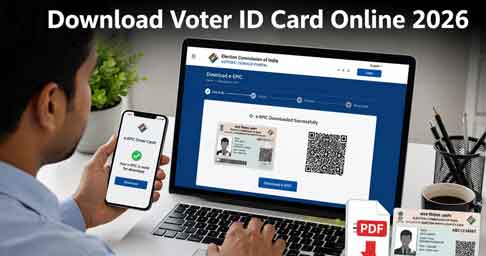
Download Voter ID Card Online is now easier than ever through the official Election Commission of India (ECI) portal. Every registered voter can download a secure digital Voter ID called e-EPIC in just a few minutes. The e-EPIC is a password-protected PDF that contains your photo, EPIC number, address, and QR code, making it a convenient alternative to carrying your physical Voter ID card.
Table of Contents
- Benefits of Downloading Voter ID Card Online
- What You Need Before You Start
- How to Download Voter ID Card Online
- Method 1: Official Website
- Method 2: Voter Helpline App
- How to Find Your EPIC Number
- Is the e-EPIC Valid for Voting?
- Frequently Asked Questions
- Conclusion
What You Need Before You Start
- Your EPIC number (printed on your existing card), or your Form Reference Number if you applied recently
- A mobile number registered and linked to your voter profile, for OTP verification
- A computer, Android phone, or iPhone with an internet connection
If your registered mobile number is outdated. update it through the portal or with your local Booth Level Officer (BLO) before you begin.
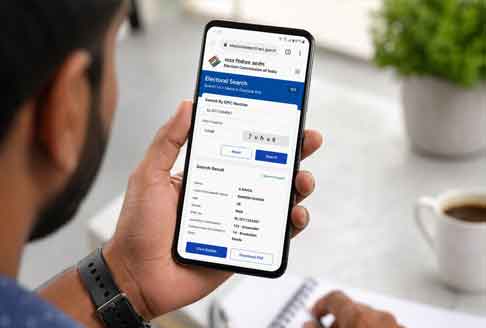
How to Find Your EPIC Number
Don’t remember your EPIC number? Use the Electoral Search portal or the “Search in Electoral Roll” option in the Voter Helpline app. Enter your name, state, and date of birth, and your EPIC number and constituency details will appear immediately.
Benefits of Downloading Voter ID Card Online
Print anytime
Completely free to download.
No office visit required.
Instant access after OTP verification.
Store safely in DigiLocker or your phone.
Is the e-EPIC Valid for Voting?
Yes. The e-EPIC is digitally signed and officially recognized by the Election Commission of India as valid proof of identity for voting and other verification purposes, on par with the physical PVC card. There’s no limit on how many times you can download or re-download it, and it costs nothing.
How to Download Voter ID Card Online
Method 1: Official Website
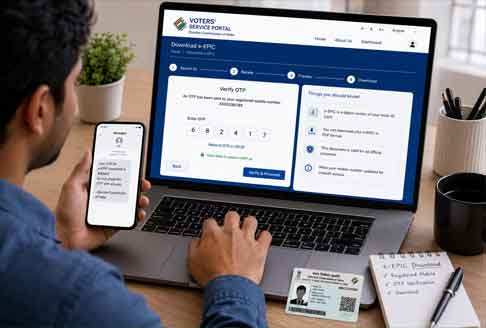
1. Visit the Official Voters’ Services Portal.
2. Click **e-EPIC Download**.
3. Log in using your mobile number.
4. Verify the OTP.
5. Enter your EPIC Number or Form Reference Number.
6. Click **Download e-EPIC**.
Method 2: Voter Helpline App
1. Install the Voter Helpline app.
2. Sign in.
3. Open e-EPIC Download.
4. Enter your details.
5. Verify OTP.
6. Download your Voter ID.
Featured Snippet
Downloading your Voter ID Card online through the official Election Commission of India portal is free and takes only a few minutes. After OTP verification, you can instantly download your digitally signed e-EPIC PDF using your EPIC Number or Form Reference Number.
Conclusion
Downloading your Voter ID card online takes only a few minutes once your EPIC number and registered mobile number are ready. Whether you use the official voters.eci.gov.in portal on a computer or the Voter Helpline app on Android or iPhone, the process is free, secure, and instant — giving you a valid digital Voter ID whenever you need it.
Frequently Asked Questions
1. Is the e-EPIC PDF a valid replacement for my physical Voter ID card? Yes. The Election Commission of India recognizes the digitally signed e-EPIC as valid proof of identity for voting and other verification, equivalent to the physical card.
2. Can I download my Voter ID card without an EPIC number? Yes. You can search using your name, state, and date of birth on the Electoral Search portal, or use your Form Reference Number if you applied recently.
3. Is there any fee to download the e-EPIC online? No. Downloading the e-EPIC from voters.eci.gov.in or the Voter Helpline app is completely free.
4. What if my registered mobile number is lost or not working? You’ll need to update your mobile number through the portal (where allowed) or by visiting your local Booth Level Officer (BLO) before you can complete OTP verification.
5. Can I download my Voter ID card on an iPhone? Yes. The Voter Helpline app is available for both Android and iOS, so iPhone users can download their e-EPIC directly through the app.
Information Source
This article is based on information published by the Election Commission of India (ECI), including the official Voters’ Services Portal, Electoral Search Portal, and the Voter Helpline mobile application.
Official Links
How to Download Voter ID Card Online
Official Website
Electoral Search
https://electoralsearch.eci.gov.in
Android App
https://play.google.com/store/apps/details?id=com.eci.citizen
iPhone App
https://apps.apple.com/in/app/voter-helpline/id1456535004
⚠️ Disclaimer
his article is for informational purposes only. ThanseenaIlyas.com is not affiliated with or endorsed by the Election Commission of India (ECI). Please verify the latest procedures and eligibility requirements through the official ECI website before submitting any application.
📢 Call to Action
Ready to get your digital Voter ID? Visit voters.eci.gov.in or download the Voter Helpline app today and get your e-EPIC in minutes — free, official, and ready whenever you need it.
Also Read
- Indian Oil eKYC Online 2026: Step-by-Step KYC Update Guide
- AIR SUVIDHA 2.0: How to Fill the Health Self-Declaration Form Before Traveling to India
- KSEB WSS Login Portal – Quick Guide to Online Services & Registration