
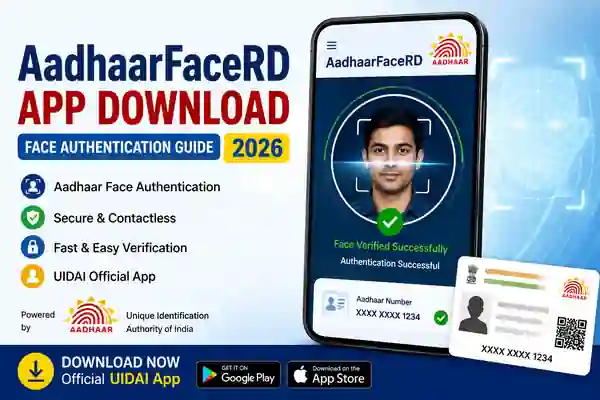
AadhaarFaceRD is the UIDAI face authentication application used as part of Aadhaar face-based authentication services. It works with an authorised entity’s application when that service supports Aadhaar Face Authentication. UIDAI explains that face authentication checks whether the face captured during authentication matches the Aadhaar holder’s stored facial biometric using a 1:1 matching process. The authentication is also consent-based.
The app is not simply a general-purpose Aadhaar management application. Instead, it acts as the Face RD component required by supported authentication services. UIDAI’s official FAQ says that users may need two applications for face authentication: the application of the service provider and the Aadhaar Face RD application from UIDAI. This distinction is important because installing Face RD alone may not provide a standalone service or menu for every Aadhaar-related task.
What Is Aadhaar Face Authentication?
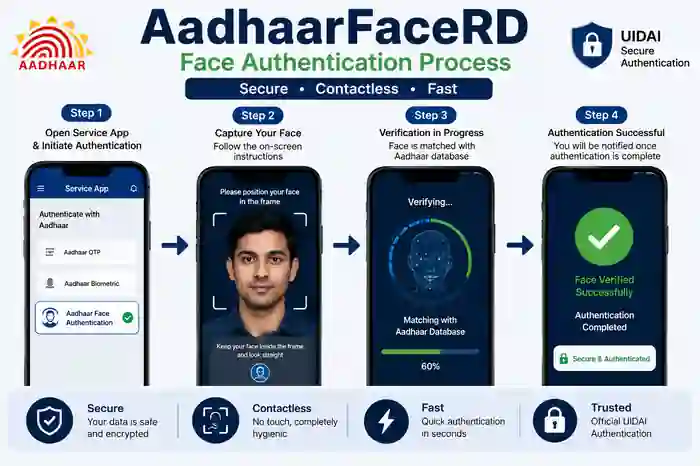
Aadhaar Face Authentication is a contactless way to verify the identity of an Aadhaar number holder. During authentication, the person’s face is captured through a compatible smartphone or tablet and matched against the facial biometric associated with the Aadhaar number. UIDAI describes this as a 1:1 match rather than general face recognition, meaning the captured face is compared with the stored biometric for the specific Aadhaar holder.
This method can be useful when a service provider supports Aadhaar face authentication as an alternative authentication method. UIDAI notes that face authentication can be used for various government schemes and services where Aadhaar authentication is adopted. It is also a contactless option, which can be useful when fingerprints are difficult to authenticate because of worn-out fingerprints or similar issues.
How to Download AadhaarFaceRD
To download AadhaarFaceRD, UIDAI directs users to the Google Play Store and asks them to search for “Aadhaar Face RD (Early Access) Application” from UIDAI. The official UIDAI FAQ currently provides the Google Play package link for the app. Users should avoid downloading APK files from random websites because unofficial applications can create privacy and security risks.
After installing the official Face RD application, the supported service application normally initiates the face authentication process when required. Therefore, users should not assume that opening Face RD alone will display all Aadhaar services. The exact workflow depends on the organisation or application requesting Aadhaar Face Authentication. Always follow the instructions shown by the authorised service.
How Aadhaar Face Authentication Works
When a supported application starts face authentication, the smartphone camera captures the user’s face. The user should position the face clearly inside the frame and remain still while the authentication process is completed. UIDAI recommends a neutral expression, open eyes, direct camera positioning, and suitable lighting for successful face capture.
The environment can make a significant difference to the result. Avoid very dark rooms, strong shadows, blurred camera images, or anything that covers important facial features. UIDAI specifically advises users to remove hats, glasses, or other coverings that may obstruct the face during capture. Following these simple instructions can help reduce repeated authentication failures.
AadhaarFaceRD Mobile Requirements
UIDAI currently states that Aadhaar face authentication can be performed on Android phones meeting specified technical requirements. The listed requirements include Android 9 or above, at least 4 GB RAM, a display of 5.5 inches or greater, a camera resolution of 13 MP or greater, and 64 GB storage with at least 500 MB of free space. These requirements can change as the Face RD technology is updated.
Therefore, users should check their phone specifications before troubleshooting the application. A compatible Android version alone may not guarantee successful authentication if the device does not meet the other requirements. If your phone is old or has limited storage, updating the operating system, freeing storage, and using a device that meets UIDAI’s current specifications may help.
Tips for Successful Face Authentication
For better results, use the phone in a well-lit place and keep your face clearly visible to the front camera. Look directly at the camera and remain still during the capture process. Avoid strong backlighting because it can make the face appear dark, and keep the camera lens clean before starting authentication. These simple steps follow UIDAI’s recommended face-capture practices.
If the first attempt fails, do not repeatedly move your head or change your position quickly. Instead, return to a properly lit location and follow the instructions displayed on the screen. Make sure the correct service application and UIDAI Face RD application are installed. If an error code appears repeatedly, UIDAI advises users to approach the concerned entity with the error code so that the authentication issue can be investigated.
AadhaarFaceRD Common Problems
One common issue is installing Face RD without installing the application of the service provider that actually requests the authentication. Since UIDAI explains that two applications may be required, users should first identify which service is asking for face authentication. Another possible cause is an incompatible device, poor lighting, insufficient storage, or an obstructed face during capture.
Users should also avoid unofficial APK websites that promise modified or “latest” versions of AadhaarFaceRD. The safest option is to follow the download route published by UIDAI and use the official Google Play listing. If the authentication continues to fail, note the error code and contact the concerned service provider or authentication entity rather than sharing Aadhaar details with unknown people.
Official AadhaarFaceRD App Download
Frequently Asked Questions
What is AadhaarFaceRD?
AadhaarFaceRD is UIDAI’s Face RD application used as part of Aadhaar Face Authentication with supported service-provider applications.
Is AadhaarFaceRD an official UIDAI app?
Yes. UIDAI officially directs users to download Aadhaar Face RD (Early Access) from Google Play for face authentication.
Can I use AadhaarFaceRD on any Android phone?
No. UIDAI lists technical requirements including Android 9 or above, 4 GB or more RAM, a 5.5-inch or larger display, a 13 MP or greater camera, and sufficient storage.
Why is AadhaarFaceRD required?
It is used as the Face RD component when an authorised service supports Aadhaar Face Authentication. The service application and Face RD application may work together during authentication.
What should I do if face authentication fails?
Check lighting, camera positioning, facial visibility, device compatibility, and the instructions shown by the service. If an error code keeps appearing, contact the concerned service provider with the error code.
Official AadhaarFaceRD Download
Conclusion
AadhaarFaceRD is an important component of UIDAI’s Aadhaar Face Authentication ecosystem. It allows supported service applications to use face-based identity verification through a compatible smartphone, providing a contactless alternative to fingerprint or iris authentication. UIDAI recommends downloading the official Face RD application through Google Play rather than using unofficial APK websites.
For the best experience, use a compatible Android device, good lighting, a clear view of your face, and the authorised application requesting authentication. If you face repeated errors, use the official UIDAI guidance and contact the concerned service provider with the displayed error code. Keeping Aadhaar-related applications updated and using only official sources is the safest approach.
Internal Links
For more useful digital government services, readers can also explore these related guides on ThanseenaIlyas.com:
- DigiLocker App – Secure Digital Storage for Documents & Certificates
- Ente Ration Card App & Kerala EPOS Portal Guide