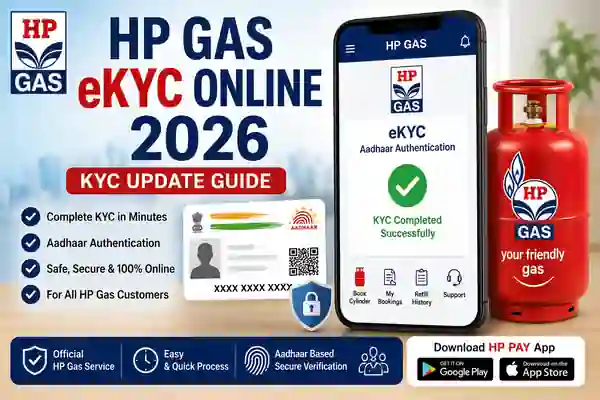
HP Gas eKYC Online 2026 is a digital customer verification facility for HP Gas LPG consumers. KYC means Know Your Customer, and the process is used to maintain and verify important customer information connected with an LPG connection. HPCL’s official LPG information states that Aadhaar authentication has been provided on the HP Gas consumer portal so that consumers can complete the authentication themselves.
The online facility can make LPG customer verification more convenient because eligible consumers may not always need to visit an HP Gas distributor for the digital authentication step. However, the exact options available can depend on the customer’s account and the current portal or app interface. Therefore, customers should always use the official HP Gas website, HP Pay app, or authorised distributor when completing KYC-related services.
Can HP Gas eKYC Be Done Online?
Yes. HP Gas eKYC Online is supported through HPCL’s digital LPG services. HPCL specifically states that eKYC is available through the HP Gas consumer portal and that Aadhaar authentication has been enabled so consumers can complete the process themselves. This makes online verification a useful option for customers who want to manage their LPG account digitally.
At the same time, users should not assume that every HP Gas account will show exactly the same options. Portal features can change, and some customers may be directed to complete certain requests through their distributor. If the eKYC option does not appear or the process fails, use HPCL’s official customer-support channels rather than third-party websites offering KYC services.
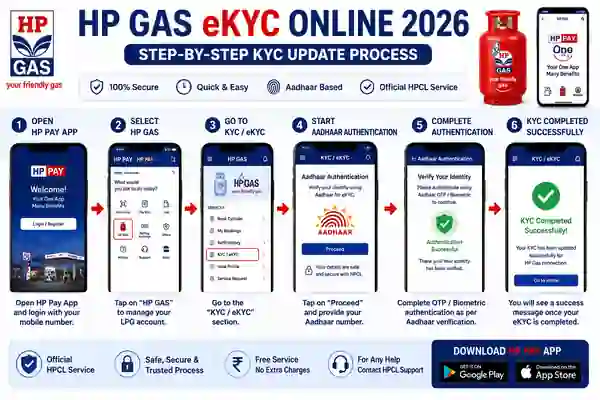
How to Complete HP Gas eKYC Online
To start HP Gas eKYC Online 2026, first open the official HP Gas consumer portal and sign in with your registered customer information. Look for the KYC, eKYC, or Aadhaar authentication option available for your LPG account. HPCL’s official information confirms that the consumer portal supports Aadhaar authentication for customers to complete the process themselves.
Follow the instructions displayed on the screen and complete the requested identity verification. Before submitting the information, carefully check your customer details and make sure you are using the official HPCL website. If your account requires additional documentation or a distributor visit, follow the instructions provided by HP Gas rather than attempting to bypass the requirement through an unofficial service.
HP Gas eKYC Using Aadhaar Authentication
Aadhaar authentication is an important part of the digital eKYC process for eligible HP Gas customers. HPCL states that Aadhaar authentication has been provisioned on the HP Gas consumer portal, allowing consumers to complete authentication themselves. This helps reduce dependence on manual verification for eligible online services.
During the authentication process, carefully follow the instructions shown by the official portal. Make sure the required mobile number and Aadhaar-related information are available when needed. Never give your Aadhaar OTP, password, banking information, or other confidential details to an unknown person claiming to complete HP Gas eKYC on your behalf.
HP Pay App for HP Gas Services
HP Pay is the official mobile application from Hindustan Petroleum Corporation Limited. HPCL’s official mobile-app page says HP Pay can be used for LPG refills and other services, while the current app listings also include HP Gas account management, new LPG connection requests, cylinder booking and payment, and other customer-service features.
The current Google Play listing identifies the developer as Hindustan Petroleum Corporation Ltd., while Apple’s App Store lists Hindustan Petroleum Corporation Limited as the developer. Therefore, users should check the developer name before installing the application. Avoid downloading modified APK files from unknown websites, especially when the app will be used for LPG and identity-related services.
Download App
Documents and Details Required
Before starting HP Gas KYC Update, keep your LPG consumer details and registered mobile number ready. HPCL’s KYC information identifies Aadhaar and several other documents as acceptable identity or address proofs for relevant LPG procedures. The exact documents required can depend on the type of request and the customer’s situation.
For an online Aadhaar authentication flow, you may not need to upload every document listed on the traditional KYC form. Follow the requirements shown on the official portal. If the system reports a mismatch in your name, address, mobile number, or other customer information, contact your authorised HP Gas distributor for the appropriate correction procedure.
What If HP Gas eKYC Is Not Working?
If HP Gas eKYC is not working, first check your internet connection and make sure you are using the official HP Gas portal or latest official HP Pay application. Temporary technical issues, incorrect customer details, or an unavailable service can prevent an online verification process from completing. Do not immediately move to an unofficial KYC website just because the official service is not responding.
If the problem continues, contact your authorised HP Gas distributor or HPCL customer support. HPCL’s official website also warns consumers about fake websites, making it particularly important to use only official HPCL domains for LPG-related services.
Internal Links – ThanseenaIlyas.com
1. DigiLocker App
DigiLocker – Secure Digital Storage for Documents & Certificates
2. Ente Ration Card App
Anchor Text: Ente Ration Card App & Kerala EPOS Portal Guide
Ente Ration Card App & Kerala EPOS Portal Guide
Internal Link sentence example
If you are also looking for other digital government services, check our DigiLocker App guide to learn how to manage important documents online.
❓ Frequently Asked Questions
What is HP Gas eKYC?
HP Gas eKYC is the digital KYC and identity authentication process associated with eligible HP Gas LPG customer services.
Can I complete HP Gas eKYC online?
Yes. HPCL states that Aadhaar authentication is available through the HP Gas consumer portal so consumers can complete the authentication themselves.
Which app is used for HP Gas services?
HP Pay is the official HPCL consumer application and includes HP Gas account management and LPG-related services.
Can Aadhaar be used for HP Gas eKYC?
Yes. HPCL’s official LPG information specifically mentions Aadhaar authentication for HP Gas consumer eKYC.
What if HP Gas eKYC fails?
Check your internet connection, customer details and official app or portal first. If the issue continues, contact your authorised HP Gas distributor or HPCL customer support.
Is HP Pay an official app?
Yes. The Google Play and Apple App Store listings identify Hindustan Petroleum Corporation Limited as the developer.
Official HP App
Watch video
Conclusion
HP Gas eKYC Online 2026 provides a convenient digital route for eligible LPG customers to complete KYC and Aadhaar authentication. HPCL officially states that Aadhaar authentication has been enabled on the HP Gas consumer portal so consumers can complete the authentication themselves. The company also provides HP Pay for managing LPG-related services from a smartphone.
For a safe KYC update, always use the official HPCL or HP Gas portal and the official HP Pay application. Keep your registered mobile number and required details ready, carefully follow the authentication instructions, and never share OTPs or confidential information with unknown people. If online eKYC is unavailable, the authorised HP Gas distributor remains the correct channel for further assistance.